Welcome
If you are looking for a DIY solution to fix your HP Pavilion DV series laptop you've come to the right place. Our guide will show you how to fix common video display and boot up issues on HP pavilion dv2000, dv6000, dv9000, and TX1000.
Common issues on HP Pavilion DV series laptops.
The following symptoms apply to HP Pavilion dv2000, dv6000, dv9000, TX1000 and Presario v3000 and v6000F.A.Q.
Q: Is it hard to take apart the laptop to get to the mainboard?A: No, Is not hard at all. If you know how to handle a screwdriver you can take everything apart in less than 30mins. Full detailed instructions included.
Q: Are the tools easy to obtain if I don't already have them?
A: Yes, All required tools are readily available at any hardware store (for $15-$30)
Q: How long will it take for you to ship the HP Pavilion repair manual?
A: No need to wait for shipping. Access to our server will be granted within 24hr of payment. Usually lot sooner.
What's included in the HP Pavilion repair manual package?
- Step by step instructions on disassembling the laptop.
- Instructions on how to fix the systemboard with common household tools.
- Picture of the location of the problem.
- Video of the whole reflow process. New!
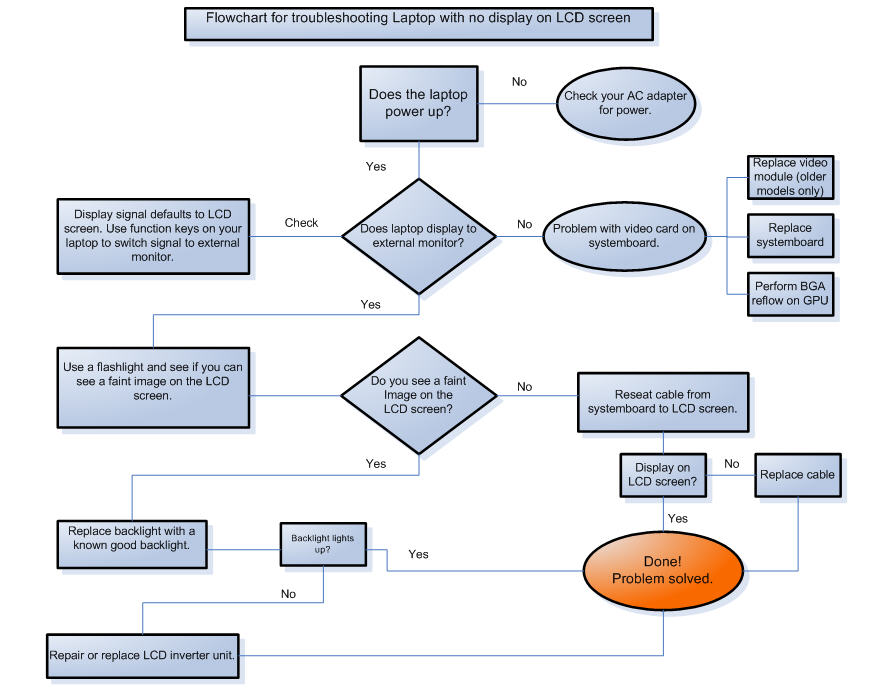
- Flowchart on how to test and see if the LCD screen is at fault.
Images of Common Issues.
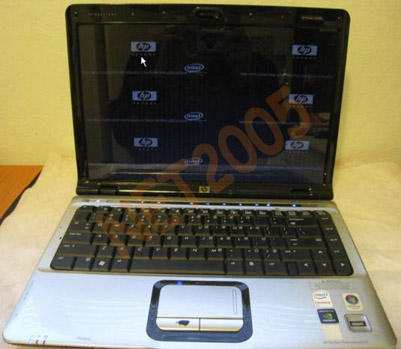
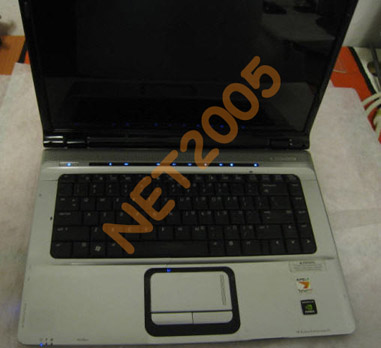
Multiple images on display
Lights comes on and boots up but no screen display
Lights comes on but system goes in a power cycle loop
Sample picture

Flowchart
Order Your HP Pavilion DIY Guide now!
No need to wait for shipping. Access to our server will be granted within 24hr of payment. Usually within hours.
only $15.00
The 15.4 and 17-inch iterations of HP's consumer-centric
Pavilion line of laptops have gotten another update from two less-than jaw
dropping, at least performance-wise, machines. Both the DV6000 and DV9000 come
out of the box with an ExpressCard slot, Altec Lansing speakers, an optional
webcam, a 5-in-1 media readers and your choice of an AMD Turion 64 X2 dual-core
or a plain old AMD Sempron processor. The 7.8-pound DV9000 (replacing the
DV8000) sports a 17-inch WXGA (yuck) or WSXGA screen, a dual hard disk
configuration and NVIDIA GeForce Go 7600 graphics. The 6.5-pound DV6000
(replacing the DV5000) rocks a 15.4-inch WXGA screen, as well as the NVIDIA
GeForce Go 7200 card, for a starting price around $850. Things get slightly
more impressive on the outside, with same piano black, Zen rock garden-inspired
design as the smaller DV2000. The DV6000 is available on HP's website right now
for a starting price of $879, but you'll have to sit and meditate a little
longer while they prepare the DV9000.
Like all the laptops in the HP Pavilion line, the dv6000's sleek design and shiny finish hold their own next to systems from style-conscious manufacturers such as Apple and Sony. Aside from its good looks, the dv6000 also provides a solid set of entertainment features and high-end components for a fair price. Those components didn't result in record-breaking performance, and its battery life was below average. For these reasons we recommend the Pavilion dv6000 for home users who want a laptop with basic entertainment features and who don't plan to spend a lot of time away from the power outlet. The HP Pavilion dv6000 measures 14 inches wide, 10.1 inches deep, and 1 inch thick--about the same size as the Dell Inspiron E1505 and the PC Club Enpower ENP680.
How to Extend Laptop
Laptop computer batteries often run out of power sooner than
would be desired. Here are some tips for making them last longer between
charges...
Screensaver: Change your laptop's screensaver to a blank (Black) screen, and set it to turn on within a few minutes of inactivity. Screensavers with graphics and sound effects will drain the power more quickly, whereas a blank screen will conserve power.
Hard Drive & Disk Drive: Avoid using the hard drive and
disk drive excessively. Because these are mechanical mechanisms, they consume
more power. In some cases, upgrading the amount of memory will reduce hard
drive usage. If your pavilion dv6000 series laptop is set to run anti-virus
scans periodically, only allow this to happen when you have it connected to AC
power, because this substantially increases hard drive usage while it is
running. If you are using an older laptop with no hard drive, consider using a
VDISK or RAMDISK (read more here) to reduce disk drive usage.
Sound/Music: If you want to listen to music while operating the computer, consider using a separate radio, cassette recorder, or CD player. If the CD player's batteries run out, you will be able to keep using the computer, which is probably your higher priority.
USB Devices: If your hp pavilion dv6000 series laptop
computer has a USB port, keep in mind that some USB devices draw power from the
computer's battery while they are plugged in to it. Avoid leaving such devices
plugged in longer than they need to be.
Software: Different software which accomplishes the same functions may cause your hp pavilion dv6000 series battery computer to use different amounts of power. If the software utilizes memory more effectively (rather than reading/writing to the disk or hard drive frequently), it may use less power. Software which places less demand on the processor can also reduce power consumption in some cases, along with programs which use a dark-colored background. Avoid running software directly from a 3.5" disk or CD-ROM, because it will cause these mechanisms to run frequently and drain the power more quickly.
Brand new high quality Li-ion replacement hp pavilion dv6000 series battery that are manufactured to meet or exceed the specifications of the original brand manufacturer and provide extended runtime with no 'memory effect', so you can charge it anytime. The battery for hp pavilion dv6000 series will help you power up your laptop in the office, business trips or vacations. Keep an extra Easy-To-Carry handy battery and enjoy the true portability of your laptop computers. This hp pavilion dv6000 series laptop battery replacement is individually tested and full one year manufacturer warranty.